
GeoEnthalpy
EN ES
PTS logs of geothermal wells

From the raw data to clear observations, in minutes.

Read the whole log. GeoEnthalpy reads your pressure, temperature and spinner logs (plus CCL and GR when the run has them), draws the BPD curve, lines everything up with the well schematic and lithology, and flags the intervals that cannot be evaluated, such as a stuck tool.

3-day free trial of the Professional plan · Prices in USD · Bilingual app (English / Spanish)

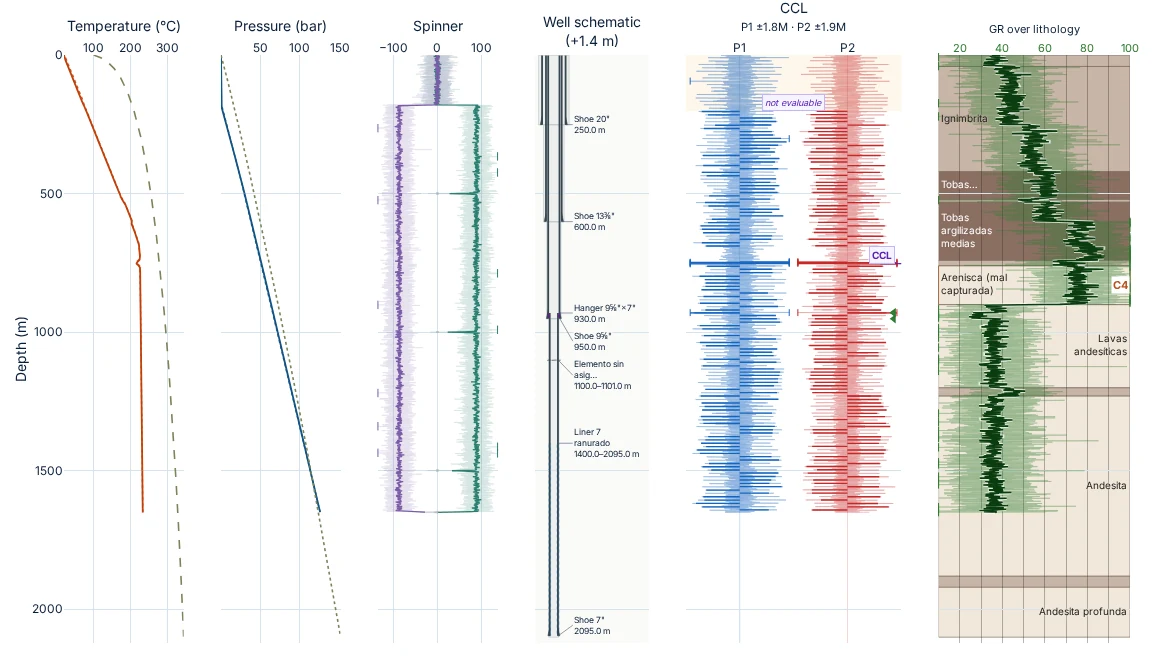
GeoEnthalpy tracks view for a noisy version of the synthetic sample well SIN-P06: temperature and pressure with the BPD curve, spinner, well schematic, CCL passes 1 and 2, and GR over lithology against depth.

Every observation is a possible indication that requires verification by a qualified professional.

How it works

Upload, process, report

Three steps from the files of a logging job to reports you can review and share.

  1. Upload your files

    Drop the tool memory (.rec) with the winch depth file (.txt, .dtr or LINEWISE), a LAS file, or temperature and pressure CSVs, in any order. Add the well schematic and the lithology column if you have them: templates are included.

  2. Processing

    GeoEnthalpy synchronises the clocks, applies each sensor offset from the tool string, separates the down (RIH) and up (POOH) passes, detects the channels present, runs data quality control and suggests possible zones and anomalies for a qualified professional to verify.

  3. Reports

    Interactive tracks, well prognosis and log comparison, exported as PNG, PDF, SVG, Excel, ZIP and RIH/POOH CSVs, with the notice inside every document.

Features

Built for the engineer who processes PTS logs

Screenshots from the GeoEnthalpy app with the synthetic sample well SIN-P06.

Well prognosis

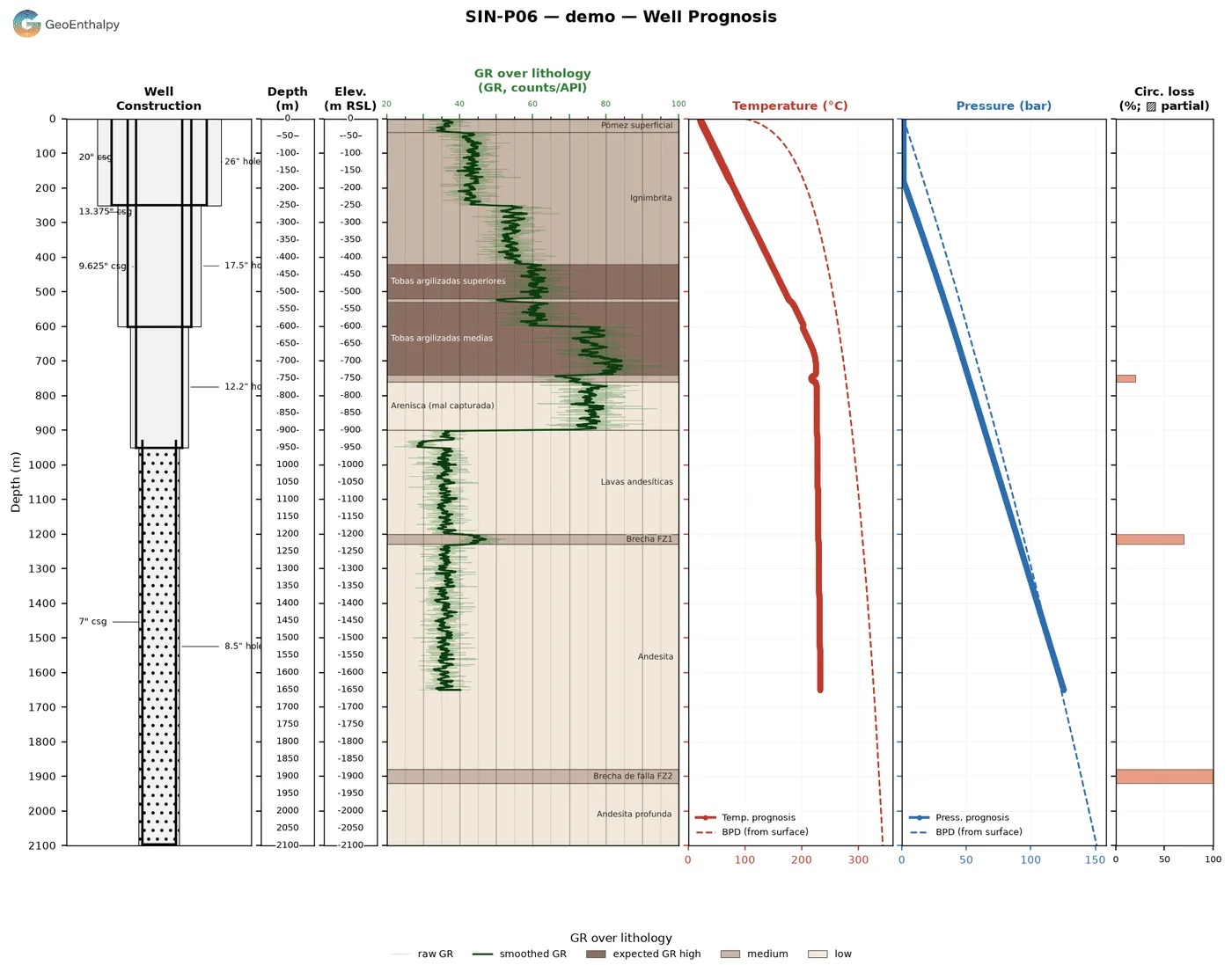
Well construction, GR over lithology, temperature and pressure against the BPD curve and circulation losses, side by side on one depth scale.

Well prognosis plot: well construction schematic, depth and elevation, GR over lithology, temperature and pressure profiles with BPD, and circulation losses.

Compare logs over time

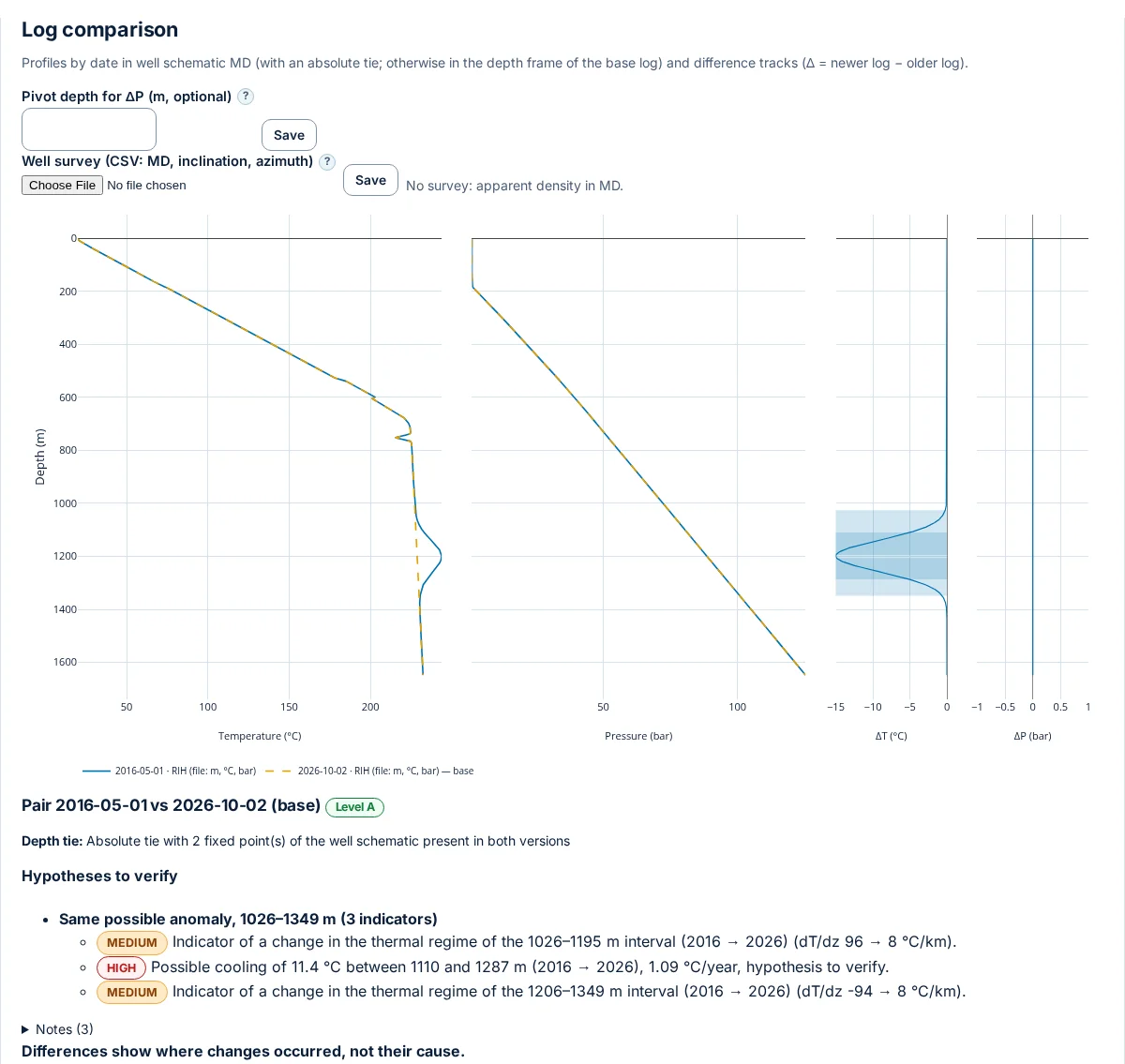
Add earlier logs of the same well and compare them by date, tied to the well schematic, with ΔT and ΔP difference tracks.

  • Absolute depth tie with fixed points of the well schematic
  • Changes grouped by interval, with confidence levels
  • Comparison exported to PDF and Excel
  • Differences show where changes occurred, not their cause
Log comparison of two dates of the same synthetic well: temperature and pressure profiles, ΔT and ΔP tracks and the list of hypotheses to verify.

Files as they come from the field

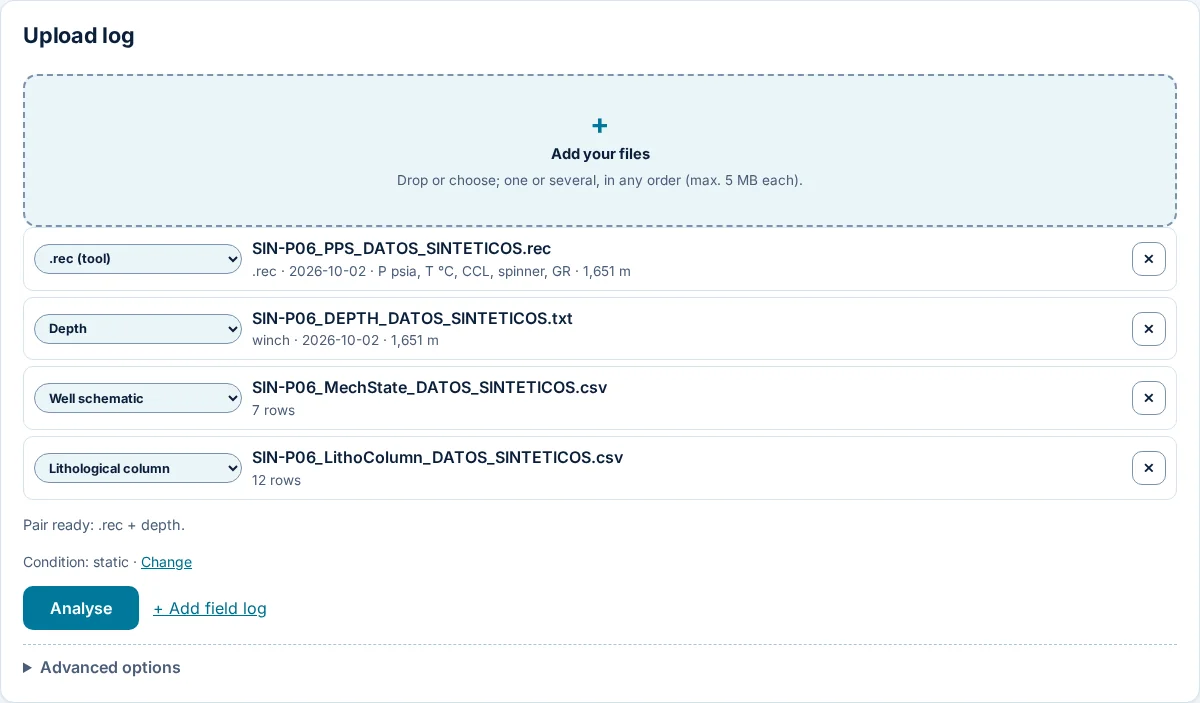
Each file is recognised by its name or its columns. The app tells you which pair is ready, the well condition (static, flowing or injecting) and the units it found.

Upload panel with four synthetic files recognised: tool .rec, winch depth, well schematic and lithological column.

Projects you can share

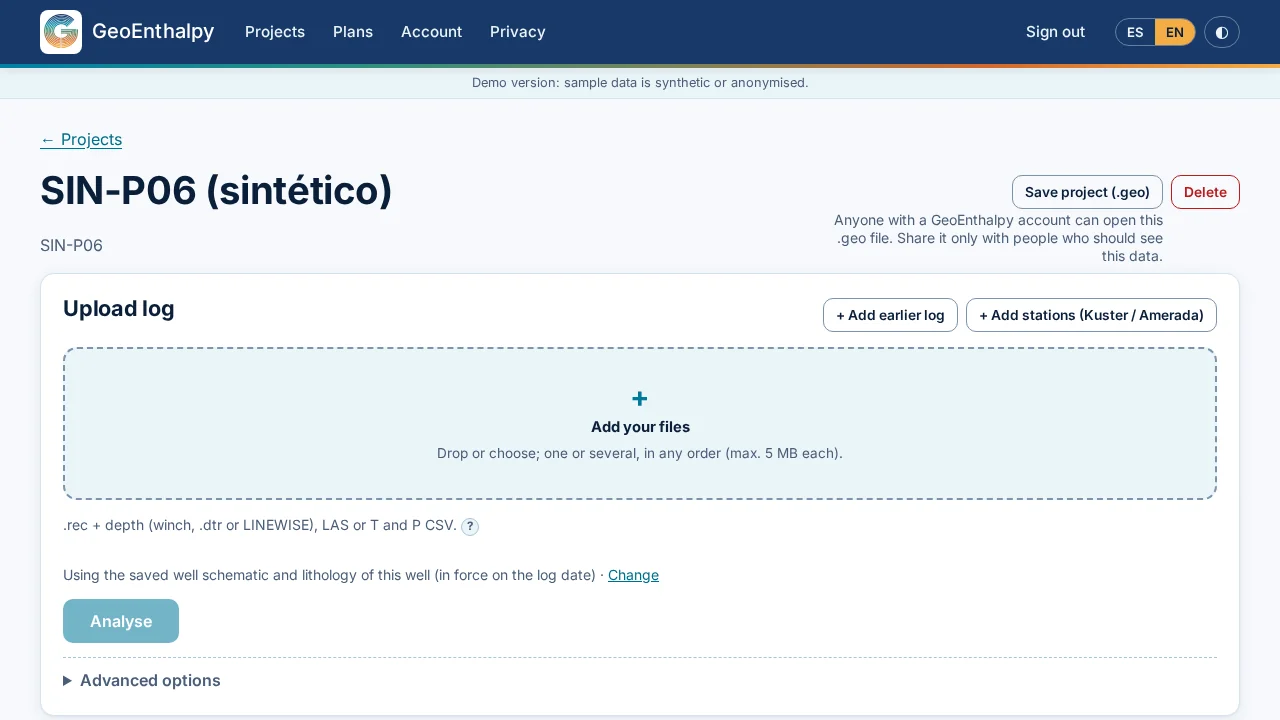
Each well keeps its logs, well schematic, lithology and analysis history. Save the whole project as a .geo file: any GeoEnthalpy account can open it.

Project page of the synthetic well SIN-P06 with the Save project (.geo) button and the upload panel.

Every track in one view

Temperature and pressure with the BPD curve, spinner, CCL over the well schematic and GR over the lithology, each sensor at its own depth.

Detected channels

PT, PTS, PTS-C or PTS-C-GR: the app adapts to what the log has and tells you which checks could not be done and why.

Stuck-tool gate

Compares slopes per pass and checks them against CCL and spinner. Those intervals are flagged as NOT EVALUABLE.

Field log cross-check

Enter the operator events of the job and GeoEnthalpy checks them against the data, without ever changing the data.

Your data, your call

Export everything as a .zip at any time. Using anonymized data to train models needs your opt-in.

Units and languages

Depth in m or ft, pressure in bar, psi or MPa, temperature in °C or °F. The app and the reports are in English and Spanish.

GEO, the GeoEnthalpy assistant: the G of the logo with two eyes.
Included in Professional

Meet GEO, your assistant

GEO is the G of our logo, now with eyes. It works inside your projects to help you:

  • Repair unreadable filesTurn files the app cannot read yet into a format it can analyse.
  • Build custom plotsAsk for the chart you need from the data of your well.
  • Tailor your reportsAdjust the report to your client or your team.

GEO can make mistakes: always check its answers against your data.

Pricing

Simple pricing in USD

Start with a 3-day free trial of the Professional plan, which includes the GEO assistant.

How the trial works. 3 days free, then 300 USD a month unless you cancel. At checkout you see the date of the first charge and the amount in USD; we email you a reminder about 24 hours before, with a link to cancel. During the trial, downloaded reports carry the watermark “TRIAL – not valid for delivery”.

Prices in US dollars (USD). Taxes may apply based on your location and are shown at checkout. Payments are processed by Stripe.

Read the step-by-step user guide (PDF)

FAQ

Frequently asked questions

Which files can I upload?

The tool memory (.rec) with the winch depth file (.txt, .dtr or LINEWISE), LAS files, or temperature and pressure tables in CSV, TSV, TXT, XLSX or XLS, up to 5 MB per file. You can also add Kuster or Amerada stations, the well schematic and the lithology column; templates are included in the app.

Does GeoEnthalpy tell me whether a well is damaged?

No. GeoEnthalpy produces preliminary observations: possible indications and hypotheses to verify. They do not establish that any damage exists. A qualified professional must verify them before any decision about the well.

How does the free trial work?

When you start the trial of the Professional plan you get all its features, including GEO, for 3 days. Reports downloaded during the trial carry a “TRIAL – not valid for delivery” watermark.

When the trial ends, the subscription continues automatically and is charged to the payment method you entered. At checkout you see the date of the first charge and the amount in USD. About 24 hours before that charge we email you a reminder with the date, the amount and a one-click link to cancel. You can also cancel at any time before the charge from your account (billing portal), and you will not be charged.

Can I share a project with someone else?

Yes. Save the project as a .geo file and send it; any GeoEnthalpy account can open it.

Where is my data stored?

Some of our service providers store information outside Canada (for example, in the United States). The details are in Section 7 of the Privacy Policy. You can export your data or close your account at any time.

Which languages and units does it support?

The app and the reports are in English and Spanish. Depth in m or ft, pressure in bar, psi or MPa, and temperature in °C or °F.

Talk to us

Want a demo or have any questions about your files? Write to us. We work with geothermal teams in:

  • Canada
  • Mexico
  • Latin America
  • Türkiye
info@geoenthalpy.com
Start 3-day free trial